What is BIN?

A Bank Identification Number (BIN) is the set of digits at the start of your credit or debit card number. It tells the payment system which institution issued the card. The same digits are also called an Issuer Identification Number (IIN)—BIN is the everyday name; IIN is the formal one.
In India you’ll hear BIN most often when an Amazon, Flipkart, jewellery, or airline offer “only works on certain BINs.” That is the shopper-side use of the same idea banks and networks already use to route every card payment.
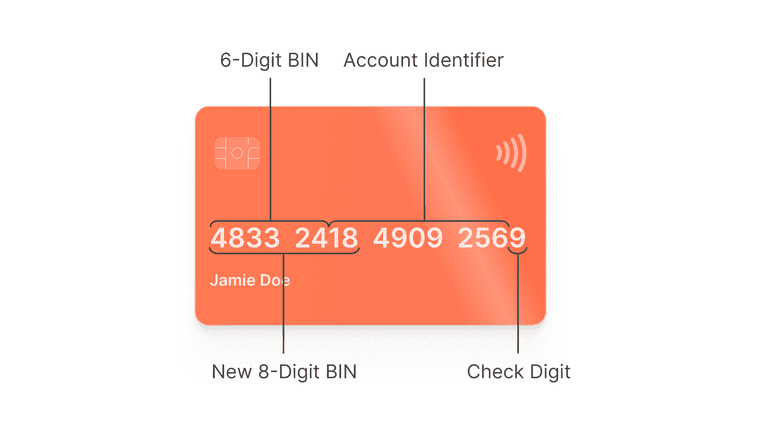
How a BIN fits inside the full card number
Your full card number (sometimes called the primary account number) is usually 15 or 16 digits, and can be longer. The opening digits are the BIN/IIN. Older cards commonly used 6-digit BINs; newer ranges often use 8 digits as more cards were issued worldwide. Digits after the BIN identify your account. The last digit is a check digit used to catch typing errors—it is not a secret like CVV.
- First digit (major industry identifier): a clue about the card’s industry/network family (for example, many Visa cards start with 4).
- Rest of the BIN/IIN: identifies the issuing bank or institution and product range.
- Middle digits: your individual account on that product.
- Last digit: check digit for number validation—not a password or CVV.
Why BINs exist
Before a payment can be approved, the network needs to know which issuer should authorise it. The BIN points the transaction to the right bank or card programme. That routing step is why two Visa cards from different banks can behave differently—and why fraud teams look at BIN details such as issuer and country when a charge looks unusual.
Example starting digits (for learning only)
These patterns are a rough guide only. Different banks issuing the same network (for example Visa) use different BIN ranges. Always confirm the card product in your bank app, and confirm offer eligibility in the offer rules.
| Network | Often starts with | Masked example | Why it matters for offers |
|---|---|---|---|
| Visa | 4… | 4XXX XX•• •••• XXXX | Visa-only bank offers can apply |
| Mastercard | 51–55 or 2221–2720 | 5XXX XX•• •••• XXXX | Mastercard-only bank offers can apply |
| American Express | 34 or 37 | 37XX XXXXXX XXXXX | Amex-only campaigns and Amex acceptance |
| RuPay | Often 6… (varies) | 6XXX XX•• •••• XXXX | RuPay / UPI credit offers and RuPay bank deals |
| Diners Club (via partners) | Depends on the bank product | Check your bank app | Partner portals and co-brand offers |
How shopping apps use BIN for offers
- You pick a bank offer at checkout (Amazon, Flipkart, Myntra, jewellery weekend, airline promo, and similar).
- The payment page reads the first digits of the card you use.
- Those digits are checked against the offer’s allowed list (sometimes also the network and product name).
- If your BIN is allowed, the discount applies. If not, you may see “offer not applicable”—even when the card is from the “right” bank.
| What you see | Likely cause | What to do |
|---|---|---|
| “HDFC Visa” offer fails on your HDFC card | Your card product is not on the offer’s allowed list | Match the exact product name in the offer rules to the name in your bank app |
| Jewellery or gold weekend discount fails | Only listed bank + network cards are allowed | Confirm the eligible card list before you book a slot |
| Flight or hotel bank promo fails at payment | Your card’s starting digits are not allowed for that promo | Keep a second eligible card ready |
| Two people at the same bank get different results | They hold different products, so different BINs | Compare product names—not only the bank logo |
Stay safe when talking about BINs
- Remember: offers often depend on BIN and on the network logo (Visa, Mastercard, RuPay, Amex).
- If an offer fails, tell support the card product name and the error message—not your full card number.
- If a store asks for the “first 6 digits” for an offline discount, share only those digits.
- Never paste a full card number, CVV, or OTP into random “BIN checker” sites or chat groups.
BIN vs related terms
| Term | What it tells you | Why shoppers care |
|---|---|---|
| BIN / IIN | Which bank or issuer issued the card | Why offer A works on one card but not another |
| MCC | How the merchant is categorised (dining, fuel, rent…) | Why rewards or cashback apply—or get blocked |
| MDR | What the merchant pays to accept cards | Why some shops prefer UPI or add a surcharge |
| Network logo | Visa / Mastercard / RuPay / Amex | Where the card works and which bank offers can show up |